
Cycle Time Calculation Software
Cycle time calculators are available to download and are divided into 10 types of files for different actuator types.
Please select the file that corresponds to the actuator you are using.


If it has already been disabled , switch the macro setting to " Enable all macros ".
++ Use cycle time calculators as a guide only. Please contact us before making any final selections. ++
There are 10 different files for different actuator types.
Click Here if you need to reset the table to show entire list of files.
Click on a file name below to open it, or right-click to save it before use.
(File format: Microsoft/Excel)
| Type | Classification | ||
|---|---|---|---|
| ELECYLINDER | Power saving Off | CycleTimeCalcEN_24VPM_EC_BU.xlsb | |
| ELECYLINDER | Power saving On | CycleTimeCalcEN_24VPM_EC_NRML.xlsb | |
ROBO Cylinder I | CycleTimeCalcEN_AC200V_(ISA_LSA_etc).xlsb | ||
ROBO Cylinder II | Supports off-board tuning | CycleTimeCalcEN_AC200V_(Models-compatible-with-off-board-tuning).xlsb | |
ROBO Cylinder II | Off-board tuning not supported | CycleTimeCalcEN_AC200V_(Models-not-compatible-with-off-board-tuning).xlsb | |
(24V servo) | Supports off-board tuning | CycleTimeCalcEN_AC24V_(Models-compatible-with-off-board-tuning).xlsb | |
(24V servo) | Off-board tuning not supported | CycleTimeCalcEN_AC24V_(Models-not-compatible-with-off-board-tuning).xlsb | |
(pulse motor) | CycleTimeCalcEN_24VPM_RCP3_or-earlier.xlsb | ||
(pulse motor) | High output On | CycleTimeCalcEN_24VPM_RCP4_BU.xlsb | |
(pulse motor) | High output Off | CycleTimeCalcEN_24VPM_RCP4_NRML.xlsb |
Other Software Files

Entering Controller Programs
The points, programs and parameters for each controller are stored in the memory of the controller itself. The information stored in the controller can be archived on any storage device by "saving" the item accordingly. Programs can be entered via software (preferred...

Upload / Download Points, Programs and Parameters to Controllers
Upload / Download Files The points, programs and parameters for each controller are stored in the memory of the controller itself. The information stored in the controller can be archived on any storage device by "saving" the item accordingly. In offline mode, one...
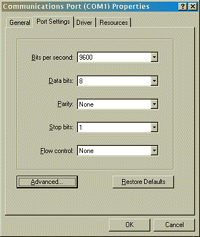
Communications Port Setup
Below are the communication port (COM port) settings for communicating with the DS, SuperSEL and SCARA: Baud Rate (Bits per second): 9600 Data Bits: 8 Parity: None Stop Bits: One Flow Control: None The Baud Rate setting for the Robo Cylinder can be set as high as...

Introduction to X-SEL PC Software Tutorial
Here is a 15 minute "Introduction to the XSEL PC Software" video tutorial. The XSEL PC Software is used with IAI's fully programmable controller line. These controllers include the X-SEL, ASEL, PSEL, and SSEL as well as many older SEL controllers. The XSEL PC software...

Running Programs
Through the software, the user can start programs and monitor their progress as code is being executed. This can also be done through the Teach Pendant, but with limited viewing area due to the small LCD readout on the Teach Pendant. Since both the Teach Pendant and...

Teaching Points
All taught positions are based upon a reference point, or "0.00 mm" location. If your actuator / controller combination features absolute encoders, homing is not necessary before teaching points. Incremental encoders will require homing before teaching points. In...
Stay Informed by Following Us
[et_social_follow icon_style="flip" icon_shape="rounded" icons_location="top" col_number="auto" counts="true" counts_num="0" total="true" outer_color="light" network_names="true"]

